Sure thing. Below is what the field configuration looks like in a "save to repository" task in the Forms process diagram for the form itself, NOT an upload. This is all based on an expense report form I have - your fields can be named whatever you want.
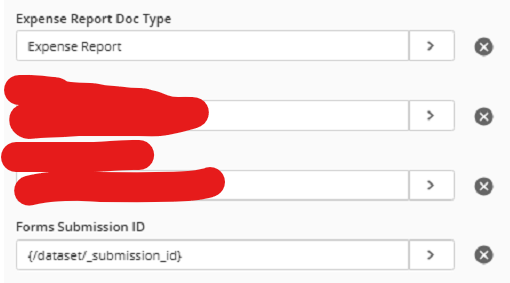
So the form itself is getting assigned a template, and the two fields you see here are being assigned to it. The Expense Report Doc Type field tells us that this document is the expense report form itself, not an upload. And the Forms Submission ID field is a string of text that uniquely identifies this particular submission to the repository.
The fields configured for files uploaded to the form looks similar, except that in my case, the Expense Report Doc Type field is assigned a value of "Receipt." This now gives Workflow what it needs to know that one (or more) document is a receipt, and one document is the image of the form. In the screenshot below, you'll see this workflow makes a decision - it does so based on the Expense Report Doc Type field. If the receipt path is taken, you can see it moves it to a different folder and delays the workflow for 1 minute to allow time for page generation (might be unnecessary but I include this in similar workflows). Then the conditional sequence at the bottom runs if the page count of the starting entry is greater than 1 and if it is, it uses the "search repository" activity to find the document with the same submission ID with an Expense Report Doc Type value of "Expense Report," and moves the pages from the starting entry to that document.
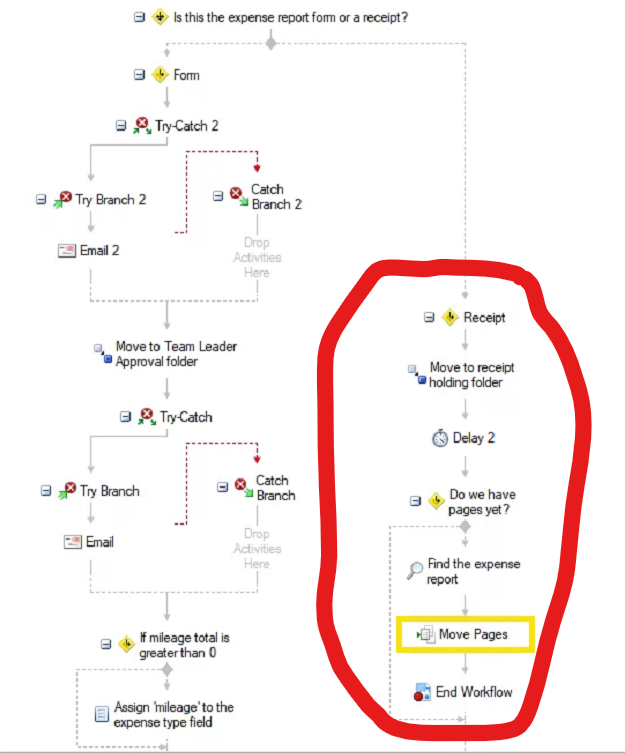
If everything works correctly, you should not have an empty document left over. In this case, the form restricts uploads to be image files or PDFs. The account that Forms uses to authenticate into Laserfiche is configured to generate pages on PDFs and NOT keep the original PDF. So I should just end up with image documents whose pages can be freely moved around.
Does that help?