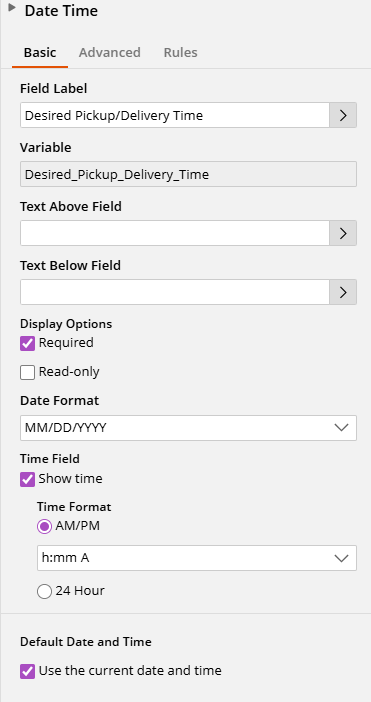
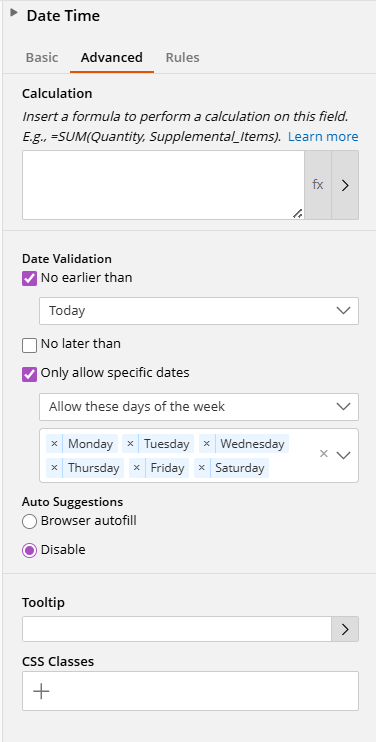
Through a combination of the configuration in the following screenshots, along with some Javascript in the main Javascript panel (not the area within the Date/Time field that allows for Javascript), I was able to get this to work.
function isValidDeliveryTime(dt) {
    var day = dt.getDay();
    var hour = dt.getHours();
    var min = dt.getMinutes();
    var totalMinutes = hour * 60 + min;

    if (day >= 1 && day <= 5) {
        // Monday–Friday: 7:00 AM (420) to 5:00 PM (1020)
        return totalMinutes >= 420 && totalMinutes <= 1020;
    } else if (day === 6) {
        // Saturday: 7:00 AM (420) to 10:00 AM (600)
        return totalMinutes >= 420 && totalMinutes <= 600;
    }
    return false;
}

// Show warning message below the field when time changes
LFForm.onFieldChange(function(event) {
    var values = LFForm.getFieldValues({ variableName: "Desired_Pickup_Delivery_Time" });

    if (!values || !values.dateTimeObj) {
        LFForm.changeFieldSettings({ variableName: "Desired_Pickup_Delivery_Time" }, { subtext: "" });
        return;
    }

    var dt = new Date(values.dateTimeObj);
    if (!isValidDeliveryTime(dt)) {
        LFForm.changeFieldSettings(
            { variableName: "Desired_Pickup_Delivery_Time" },
            { subtext: "⚠️ Invalid time. Mon–Fri: 7:00 AM–5:00 PM, Saturday: 7:00 AM–10:00 AM." }
        );
    } else {
        LFForm.changeFieldSettings({ variableName: "Desired_Pickup_Delivery_Time" }, { subtext: "" });
    }
}, { variableName: "Desired_Pickup_Delivery_Time" });

// Block form submission if time is invalid
LFForm.onFormSubmission(function() {
    var values = LFForm.getFieldValues({ variableName: "Desired_Pickup_Delivery_Time" });

    if (!values || !values.dateTimeObj) return;

    var dt = new Date(values.dateTimeObj);
    if (!isValidDeliveryTime(dt)) {
        return { error: "Please select a valid delivery time. Mon–Fri: 7:00 AM–5:00 PM, Saturday: 7:00 AM–10:00 AM." };
    }
});
Javascript was courtesy of Claude, so it's very possible this could be improved. But it appears to be doing what I need it to. The date picker was either defaulting to showing January, or it wouldn't display a month name at all, and the configuration above all seems to work together to avoid that.