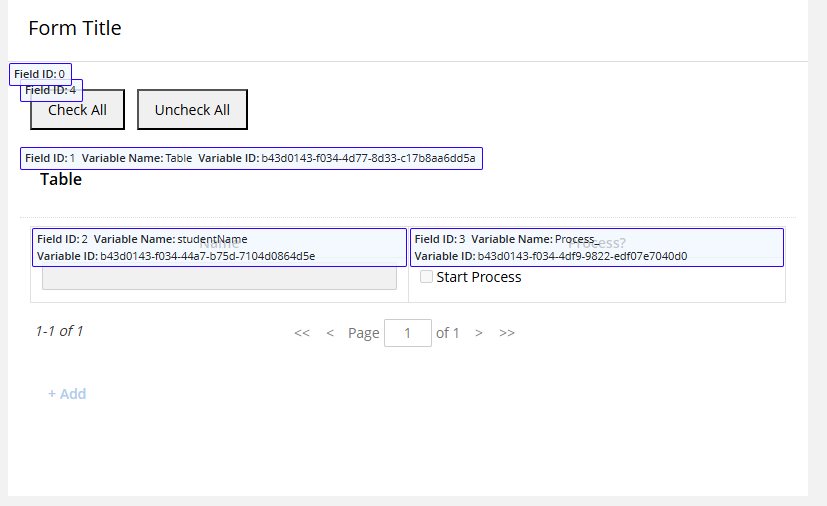
This works on my test form. I attached the BP here as a text but you'll have to change it to an XML and import it.
If you want to build a form manually it's easy; I suggest building a test form to see how this works and then add it to your live form.
Here's what you need:
Add a custom html field to your form and use this code.
<button type="button" onclick="checkAllRows()" style="padding:8px 16px; cursor:pointer;">
  Check All
</button>
<button type="button" onclick="uncheckAllRows()" style="padding:8px 16px; cursor:pointer; margin-left:8px;">
  Uncheck All
</button>
Then in the JS of the form add this. Assuming here that your checkbox is fieldID 3 and your checkbox values is "YES".
// Check every checkbox in the table (field 3) — works for any row count.
window.checkAllRows = function () {
  const CHECKED   = { value: ["YES"], otherChoiceValue: "" };
  const rows      = LFForm.getFieldValues({ fieldId: 3 }) || [];
  const rowCount  = rows.length;

  // Primary approach: column-wide broadcast (the one-liner you proved works).
  LFForm.setFieldValues({ fieldId: 3, rowIndex: 0 }, CHECKED);

  // Verify; if any row didn't take, fall back to per-row writes.
  const after = LFForm.getFieldValues({ fieldId: 3 }) || [];
  const allChecked = after.every(r => Array.isArray(r?.value) && r.value.includes("YES"));
  if (!allChecked) {
    for (let i = 0; i < rowCount; i++) {
      LFForm.setFieldValues({ fieldId: 3, rowIndex: i }, CHECKED);
    }
  }
};

window.uncheckAllRows = function () {
  const UNCHECKED = { value: [], otherChoiceValue: "" };
  const rowCount  = (LFForm.getFieldValues({ fieldId: 3 }) || []).length;

  LFForm.setFieldValues({ fieldId: 3, rowIndex: 0 }, UNCHECKED);

  const after = LFForm.getFieldValues({ fieldId: 3 }) || [];
  const allUnchecked = after.every(r => !Array.isArray(r?.value) || r.value.length === 0);
  if (!allUnchecked) {
    for (let i = 0; i < rowCount; i++) {
      LFForm.setFieldValues({ fieldId: 3, rowIndex: i }, UNCHECKED);
    }
  }
};