Hi, @████████,
I'm not sure if what I'm about to share here will be helpful to you, but take a look anyway and let me know.
The following code works as follows:
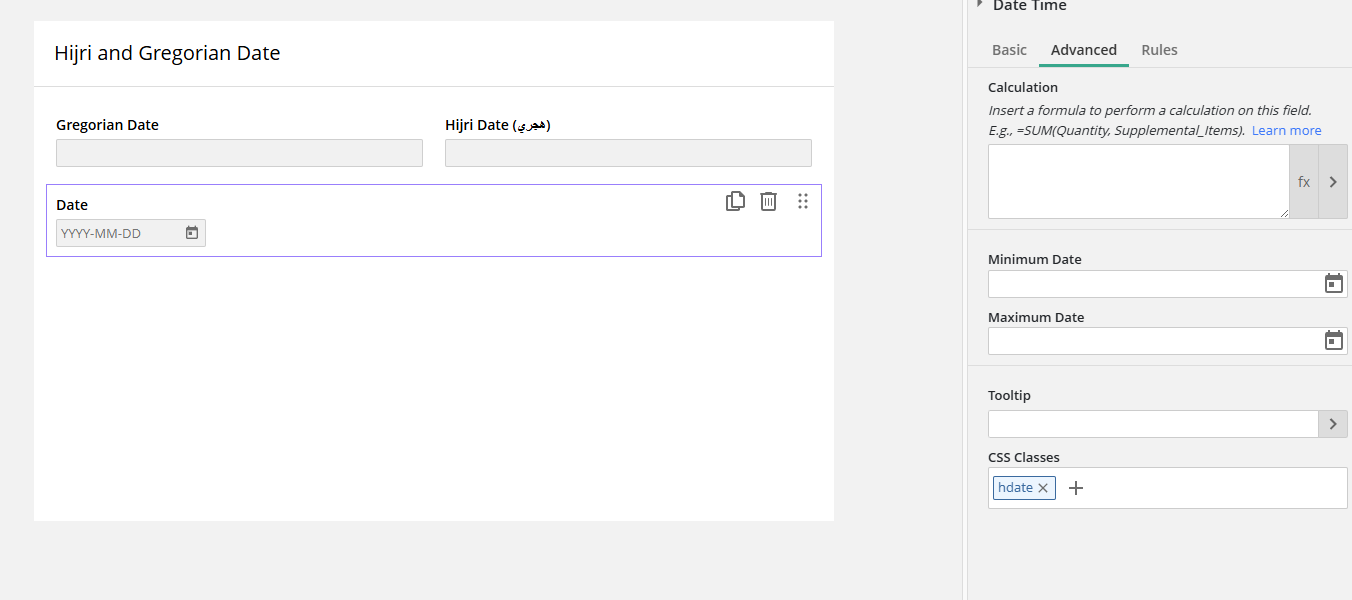
You set up three fields, two text fields and one date field. In my proposed setup, I've named the first text field as follows:
1. Text Field: Gregorian Date
2. Text Field: Hijri Date (هجري)
3. Date Field: Date (We will hide this field using CSS; it will store the date in Gregorian format for use within Laserfiche).
In your specific case, take the IDs assigned to those fields in your environment and replace the corresponding IDs within the JavaScript code.
// =============================================
// CONFIGURATION
// =============================================
var ID_GREGORIAN = 1;  // Text field — Gregorian Date (visible to user)
var ID_HIJRI     = 2;  // Text field — Hijri Date (visible to user)
var ID_DATE_REPO = 3;  // Date field — hidden via CSS, stores value in repository
// =============================================

var isUpdating = false; // Prevents infinite loop between the two onChange listeners

// =============================================
// CONVERSION: Gregorian → Hijri
// Input:  string "YYYY-MM-DD" (Gregorian)
// Output: string "YYYY-MM-DD" (Hijri) or '' if invalid
// =============================================
function gregorianToHijri(dateStr) {
  if (!dateStr || dateStr.length < 10) return '';
  var parts = dateStr.split('-');
  if (parts.length !== 3) return '';
  var gy = parseInt(parts[0], 10);
  var gm = parseInt(parts[1], 10);
  var gd = parseInt(parts[2], 10);
  if (isNaN(gy) || isNaN(gm) || isNaN(gd)) return '';

  var a = Math.floor((14 - gm) / 12);
  var y = gy + 4800 - a;
  var m = gm + 12 * a - 3;
  var jdn = gd + Math.floor((153 * m + 2) / 5)
    + 365 * y + Math.floor(y / 4)
    - Math.floor(y / 100)
    + Math.floor(y / 400)
    - 32045;

  var l = jdn - 1948440 + 10632;
  var n = Math.floor((l - 1) / 10631);
  l = l - 10631 * n + 354;
  var j = Math.floor((10985 - l) / 5316)
    * Math.floor((50 * l) / 17719)
    + Math.floor(l / 5670)
    * Math.floor((43 * l) / 15238);
  l = l - Math.floor((30 - j) / 15)
    * Math.floor((17719 * j) / 50)
    - Math.floor(j / 16)
    * Math.floor((15238 * j) / 43)
    + 29;
  var hM = Math.floor((24 * l) / 709);
  var hD = l - Math.floor((709 * hM) / 24);
  var hY = 30 * n + j - 30;

  var mm = hM < 10 ? '0' + hM : '' + hM;
  var dd = hD < 10 ? '0' + hD : '' + hD;
  return hY + '-' + mm + '-' + dd;
}

// =============================================
// CONVERSION: Hijri → Gregorian
// Input:  string "YYYY-MM-DD" (Hijri)
// Output: string "YYYY-MM-DD" (Gregorian) or '' if invalid
// =============================================
function hijriToGregorian(dateStr) {
  if (!dateStr || dateStr.length < 10) return '';
  var parts = dateStr.split('-');
  if (parts.length !== 3) return '';
  var hY = parseInt(parts[0], 10);
  var hM = parseInt(parts[1], 10);
  var hD = parseInt(parts[2], 10);
  if (isNaN(hY) || isNaN(hM) || isNaN(hD)) return '';

  var jd = Math.floor((11 * hY + 3) / 30)
    + 354 * hY + 30 * hM
    - Math.floor((hM - 1) / 2)
    + hD + 1948440 - 385;

  var l  = jd + 68569;
  var n  = Math.floor(4 * l / 146097);
  l      = l - Math.floor((146097 * n + 3) / 4);
  var i  = Math.floor(4000 * (l + 1) / 1461001);
  l      = l - Math.floor(1461 * i / 4) + 31;
  var j  = Math.floor(80 * l / 2447);
  var gD = l - Math.floor(2447 * j / 80);
  l      = Math.floor(j / 11);
  var gM = j + 2 - 12 * l;
  var gY = 100 * (n - 49) + i + l;

  var mm = gM < 10 ? '0' + gM : '' + gM;
  var dd = gD < 10 ? '0' + gD : '' + gD;
  return gY + '-' + mm + '-' + dd;
}

// =============================================
// VALIDATION: Enforce YYYY-MM-DD format on keydown
// - Blocks any character that is not a digit or control key
// - Auto-inserts hyphens after position 4 and 7
// - Shows error subtext if format is incomplete on blur
// =============================================
function applyDateMask(fieldId) {
  var selector = '[data-field-id="' + fieldId + '"] input';
  var input = document.querySelector(selector);
  if (!input) return;

  input.addEventListener('keydown', function(e) {
    var allowed = ['Backspace', 'Delete', 'ArrowLeft', 'ArrowRight', 'Tab', 'Enter'];
    if (allowed.indexOf(e.key) !== -1) return;
    if (!/^\d$/.test(e.key)) {
      e.preventDefault();
    }
  });

  input.addEventListener('input', function() {
    var raw = input.value.replace(/[^0-9]/g, '');
    var formatted = '';
    if (raw.length <= 4) {
      formatted = raw;
    } else if (raw.length <= 6) {
      formatted = raw.slice(0, 4) + '-' + raw.slice(4);
    } else {
      formatted = raw.slice(0, 4) + '-' + raw.slice(4, 6) + '-' + raw.slice(6, 8);
    }
    input.value = formatted;
  });

  input.addEventListener('blur', function() {
    var val = input.value;
    var isValid = /^\d{4}-\d{2}-\d{2}$/.test(val);
    if (val !== '' && !isValid) {
      LFForm.changeFieldSettings(
        {fieldId: fieldId},
        {subtext: '⚠ Invalid format. Please enter date as YYYY-MM-DD (e.g. 2024-05-15)'}
      );
    } else {
      LFForm.changeFieldSettings({fieldId: fieldId}, {subtext: ''});
    }
  });
}

// =============================================
// INIT — Runs on form load
// Sets placeholders and applies input masks to both date fields.
// setTimeout ensures the LF/Angular DOM is fully rendered before
// querying the input elements.
// =============================================
setTimeout(function() {
  LFForm.changeFieldSettings({fieldId: ID_GREGORIAN}, {placeholder: 'YYYY-MM-DD'});
  LFForm.changeFieldSettings({fieldId: ID_HIJRI},     {placeholder: 'YYYY-MM-DD'});
  applyDateMask(ID_GREGORIAN);
  applyDateMask(ID_HIJRI);
}, 500);

// =============================================
// LISTENER: Gregorian field changed
// Converts the entered Gregorian date to Hijri and updates:
//   - The Hijri text field (ID_HIJRI)
//   - The hidden Date field mapped to the repository (ID_DATE_REPO)
// Only triggers when the value matches YYYY-MM-DD format.
// =============================================
LFForm.onFieldChange(function() {
  if (isUpdating) return;
  var val = LFForm.getFieldValues({fieldId: ID_GREGORIAN});
  if (val && val.match(/^\d{4}-\d{2}-\d{2}$/)) {
    isUpdating = true;
    var hijri = gregorianToHijri(val);
    LFForm.setFieldValues({fieldId: ID_HIJRI}, hijri).then(function() {
      LFForm.setFieldValues({fieldId: ID_DATE_REPO}, {dateStr: val}).then(function() {
        isUpdating = false;
      });
    });
  }
}, {fieldId: ID_GREGORIAN});

// =============================================
// LISTENER: Hijri field changed
// Converts the entered Hijri date to Gregorian and updates:
//   - The Gregorian text field (ID_GREGORIAN)
//   - The hidden Date field mapped to the repository (ID_DATE_REPO)
// Only triggers when the value matches YYYY-MM-DD format.
// =============================================
LFForm.onFieldChange(function() {
  if (isUpdating) return;
  var val = LFForm.getFieldValues({fieldId: ID_HIJRI});
  if (val && val.match(/^\d{4}-\d{2}-\d{2}$/)) {
    isUpdating = true;
    var gregorian = hijriToGregorian(val);
    LFForm.setFieldValues({fieldId: ID_GREGORIAN}, gregorian).then(function() {
      LFForm.setFieldValues({fieldId: ID_DATE_REPO}, {dateStr: gregorian}).then(function() {
        isUpdating = false;
      });
    });
  }
}, {fieldId: ID_HIJRI});
Now you need to hide the date field. In my case, I used the CSS class `hdate`; you can apply this to the field via the "Advanced Options" under "CSS Classes." This CSS code should be placed in the form's CSS section.
.hdate {
  display: none !important;
}
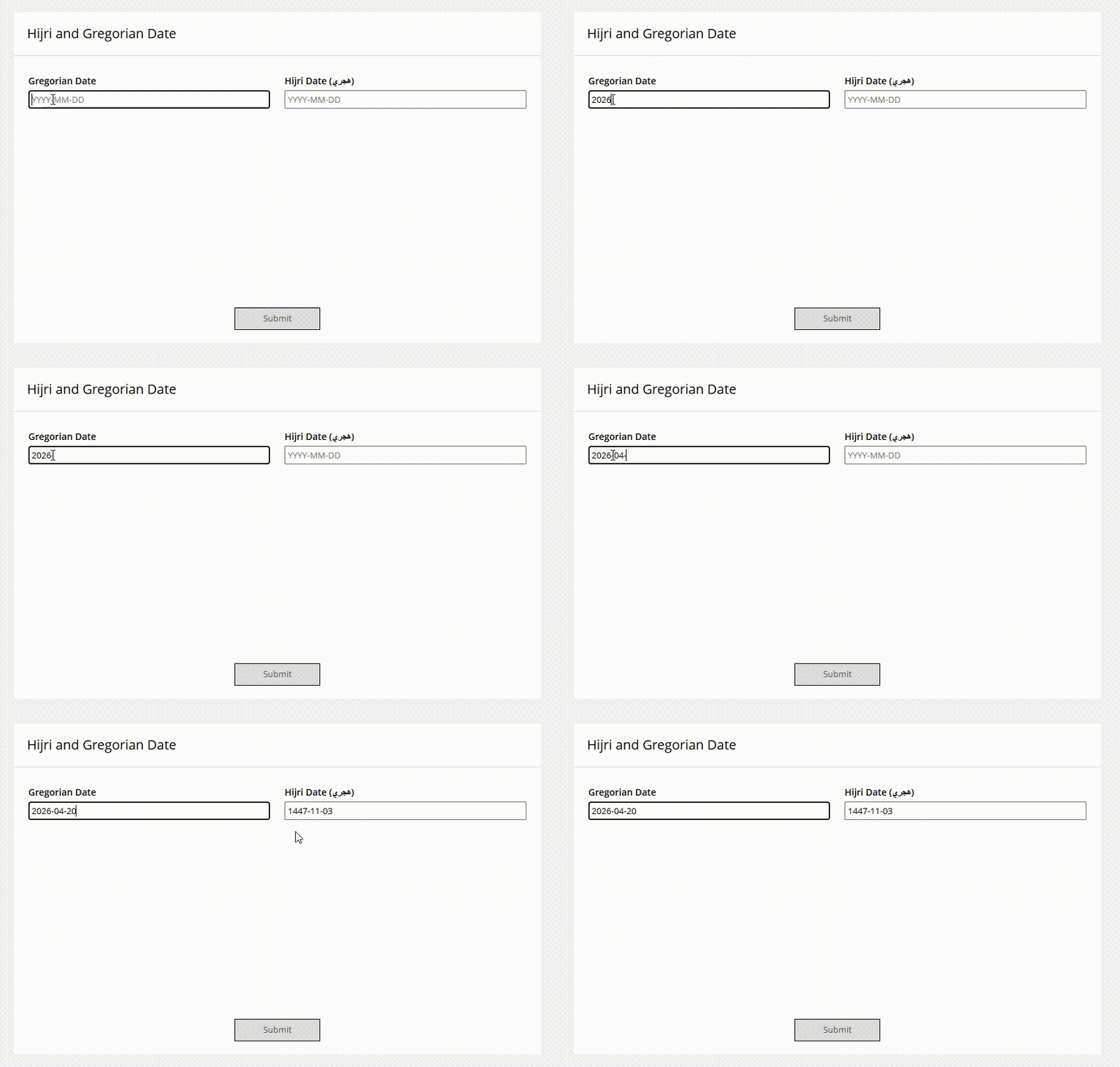
So, when you enter a date in either of the two fields, whether Gregorian or Hijri, it will automatically populate the Gregorian date; conversely, if you type in the Gregorian field, it will automatically populate the Hijri date.
Let me know if that helps.