You are viewing limited content. For full access, please sign in.

Question

Question

How do I say OCR "yes" for document types in a workflow, where is that handled?

asked on April 8

I am taking over for a self-hosted Laserfiche environment (11) that isn't very well documented. We have an Archiving plan very well defined in an Excel spreadsheet and some of our document types say OCR = yes. I am just trying to understand and find where this OCR checkbox lives. I think I was shown it one time when we were creating a new Template so I feel like it should somehow be linked to what templates are used, and it was just a simple little checkbox. Where can I look or what screenshots can I provide anyone that feels like they can advise?

Thank you!

0 0

Replies

replied on April 8 • Show version history

Hi Tracey,

There are a variety of places where you'll encounter OCR settings. It can be configured as a default on a per-user basis if you have users creating/importing documents themselves. Applications like Import Agent, which creates documents in Laserfiche, can be configured to OCR the documents they import/create. There is also an application called Distributed Computing Cluster which can be used in tandem with Workflow to perform OCR jobs, typically with Workflow finding the documents that need to be OCR'd and then using a Schedule OCR activity to queue them up in DCC.

Happy to elaborate on any of these. Do you know which method(s) of document creation/import you're primarily working with?

Edit: Since you mentioned a checkbox, you may be referring to the user-specific settings. Below is a screenshot of the Laserfiche desktop client after logging in and going to menu bar at the top to Tools -> Options. This allows you to set the default behavior for what happens to documents that are created by the user you're logged in as. That may be what you're referring to?

0 0
replied on April 9

Hi Jacob,

Thank you for the detailed response — this is really helpful context. To answer your question, we use a combination of methods for document creation:

1. Import Agent — we use this for ingesting specific document types automatically based on a defined filename naming convention. Documents land in Laserfiche with metadata already populated via SQL lookups.

2. Manual filing via the Laserfiche desktop client (drag/drop to Dropbox) — filers drag documents to a Dropbox - Incoming Documents folder, select a template, fill in metadata fields, and click OK. Workflow then renames and files the document automatically.

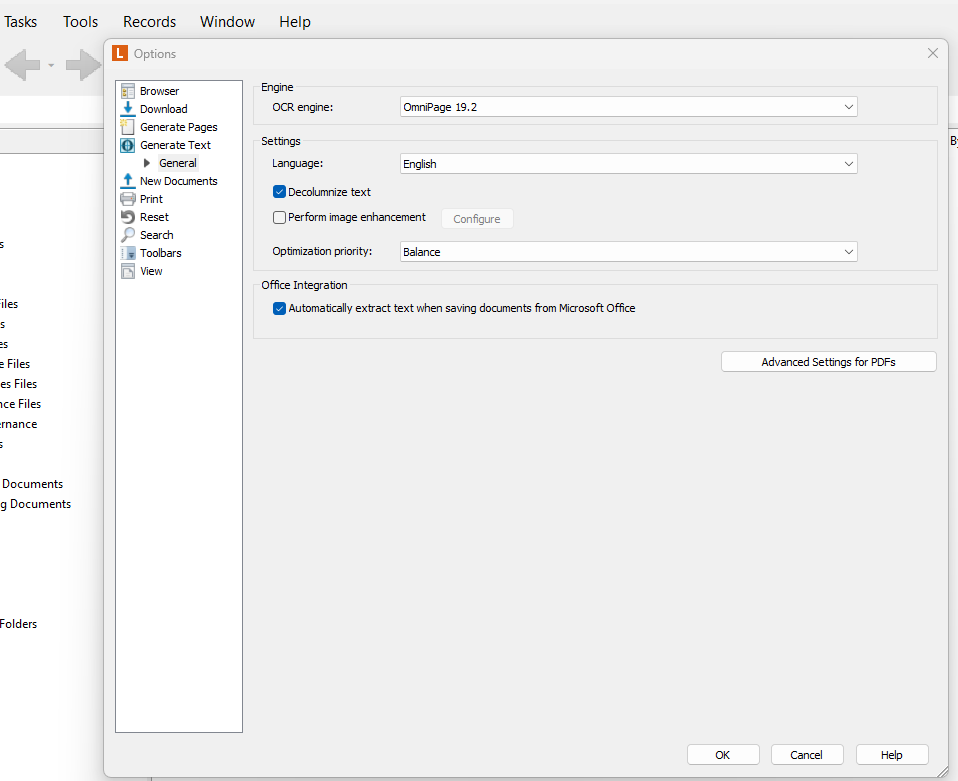
Regarding the checkbox you referenced in Tools → Options → New Documents → Settings — I am attaching a screenshot of what our Generate Text options look like for comparison. We can see the OCR engine is OmniPage 19.2, and we have engine-level settings (language, decolumnize text, image enhancement, optimization priority), but we do not have the "Generate searchable text" checkbox under a New Documents → Settings node like your screenshot shows. Our Generate Text section expands only to a General node which shows engine configuration, not an import trigger. Could this be a client version difference, or perhaps a difference in how our Laserfiche Server is configured?

Based on my research into our environment, OCR may be handled in one of three ways depending on how the document enters Laserfiche:

- For manual filers: OCR is a manual step at filing time. The filer goes to the General tab on the document and checks "Generate Searchable Text" and "Generate Laserfiche Pages" before clicking OK. This is entirely dependent on filer training and discipline — there is no system enforcement by document type.

- For Import Agent jobs: OCR is not happening automatically. Import Agent handles filename parsing, SQL lookups, and metadata population, but does not OCR the documents it deposits. We are exploring whether a downstream Workflow activity could handle this after filing.

Since our archiving plan defines OCR = Yes or No per document type, I'm trying to close the gap and make OCR automatic and document-type-aware for documents that require it.

I'm starting to suspect this OCR requirement has actually never been respected in our environment for many years — based on the difference between your screenshot and ours, it seems like either we are missing a configuration that was never set up, or we need to build a step into our workflow to trigger OCR conditionally by document type. Is that even something Workflow can do natively?

Two specific questions:
1. Can you elaborate on whether Import Agent can be configured to OCR on ingest, and whether that can be conditioned by document type?
2. Do you have any insight into why our Options screen may not show the same New Documents → Settings checkbox that yours does, and whether that is something that can be enabled?

Thank you again!
0 0
replied on April 9

1. Yes, Import Agent should be able to OCR documents upon ingestion. Screenshot below of what the OCR settings look like for a particular Import Agent profile:

This setting is just for one particular import profile - it's not an app-wide setting for Import Agent. For example, in my screenshot below, I have 4 different import profiles. They can all have different OCR settings:


2. In the screenshot you posted, you're in the Generate Text -> General section of the Options window. See if New Documents -> Settings allows you to see the OCR defaults for the user you're logged in as. 

0 0
replied on April 9

I had to move onto another project for the day, but Monday I will get back to this a little deeper, but for the last point, here are my Settings from New Documents:

0 0
replied on April 9 • Show version history

So I believe what that checkbox does is basically causes the checkbox in my screenshot below to be checked by default. The screenshot below is what you see if you import a document into Laserfiche through the desktop client.

And again, this is user-specific. So your users who would be importing documents manually like this would need to update this setting. It's probably something that can be done with user attributes through the Administration Console, but I'm not exactly sure which attribute or series of attributes you'd need to set. But this should ultimately take care of OCRing documents at document creation for documents imported by users.

0 0
You are not allowed to follow up in this post.

Sign in to reply to this post.