Hi Jacob,
Thank you for the detailed response — this is really helpful context. To answer your question, we use a combination of methods for document creation:
1. Import Agent — we use this for ingesting specific document types automatically based on a defined filename naming convention. Documents land in Laserfiche with metadata already populated via SQL lookups.
2. Manual filing via the Laserfiche desktop client (drag/drop to Dropbox) — filers drag documents to a Dropbox - Incoming Documents folder, select a template, fill in metadata fields, and click OK. Workflow then renames and files the document automatically.
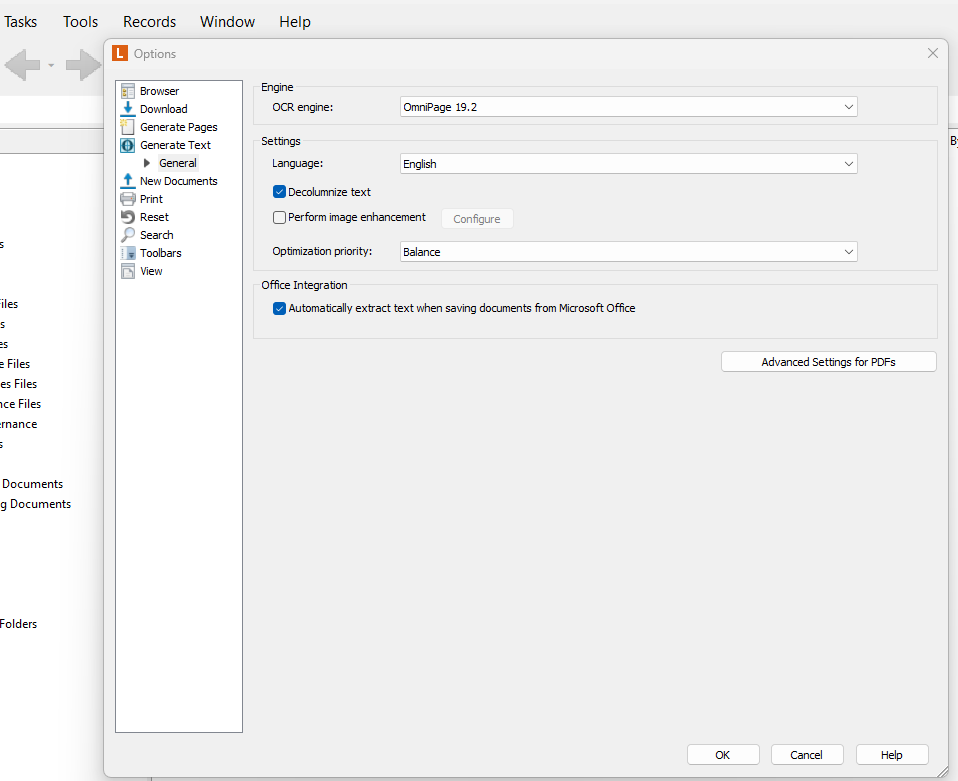
Regarding the checkbox you referenced in Tools → Options → New Documents → Settings — I am attaching a screenshot of what our Generate Text options look like for comparison. We can see the OCR engine is OmniPage 19.2, and we have engine-level settings (language, decolumnize text, image enhancement, optimization priority), but we do not have the "Generate searchable text" checkbox under a New Documents → Settings node like your screenshot shows. Our Generate Text section expands only to a General node which shows engine configuration, not an import trigger. Could this be a client version difference, or perhaps a difference in how our Laserfiche Server is configured?
Based on my research into our environment, OCR may be handled in one of three ways depending on how the document enters Laserfiche:
- For manual filers: OCR is a manual step at filing time. The filer goes to the General tab on the document and checks "Generate Searchable Text" and "Generate Laserfiche Pages" before clicking OK. This is entirely dependent on filer training and discipline — there is no system enforcement by document type.
- For Import Agent jobs: OCR is not happening automatically. Import Agent handles filename parsing, SQL lookups, and metadata population, but does not OCR the documents it deposits. We are exploring whether a downstream Workflow activity could handle this after filing.
Since our archiving plan defines OCR = Yes or No per document type, I'm trying to close the gap and make OCR automatic and document-type-aware for documents that require it.
I'm starting to suspect this OCR requirement has actually never been respected in our environment for many years — based on the difference between your screenshot and ours, it seems like either we are missing a configuration that was never set up, or we need to build a step into our workflow to trigger OCR conditionally by document type. Is that even something Workflow can do natively?
Two specific questions:
1. Can you elaborate on whether Import Agent can be configured to OCR on ingest, and whether that can be conditioned by document type?
2. Do you have any insight into why our Options screen may not show the same New Documents → Settings checkbox that yours does, and whether that is something that can be enabled?
Thank you again!