I don't know if this solutions can help you somehow for hiding the +Add link, but I'll leave this here just in case it applies to your situation, specifically, if it becomes necessary to allow the people populating the collection to specify how many records they intend to insert.
This is how to limit the number of sets in a collection using JavaScript
If you want to allow users to define how many sets (rows) they can add to a Collection field. Once the limit is reached, the + Add button should be hidden automatically.
Overview:
This solution uses:
- A Number field where the user enters the desired limit
- A Collection field with a CSS class assigned
- JavaScript using the LFForm API (Modern Design only)
- A small CSS rule to hide the + Add button
Step 1: Add a Number Field
- Open your form in the Modern Design Form Designer
- Drag a Number field onto the canvas (do NOT use a Single Line/Text field, it must be Number so LFForm.getFieldValues() returns a numeric value directly)
- Label it something like "Number of Records" or "Add #"
- Note its Field ID, you can find it by hovering over the field in the designer. It will show a label like:
Field ID: 5 Variable Name: Add__1
In this example the Field ID is 5. Replace it with your own Field ID in the script.
Step 2: Configure the Collection Field
- Drag a Collection field onto the canvas
- Add whatever fields you need inside the collection (e.g. Single Line, Dropdown, etc.)
- Note its Field ID, same way as above. Example:
Field ID: 1 Variable Name: Collection
In this example the Field ID is 1. Replace it with your own Field ID in the script.
Step 3: Add the CSS
- In the Form Designer, go to the CSS tab (or the Styles section)
- Add the following rule:
/* Hides the + Add button inside the collection when the CSS class is applied via JavaScript */
.hide-add-btn-container .collection-set-add {
  display: none !important;
}
The .collection-set-add class is the internal Laserfiche Angular class for the + Add button. The !important ensures it overrides any default styles.
Step 4: Add the JavaScript
- In the Form Designer, go to the JavaScript tab
- Paste the following script, replacing fieldId: 5 with your Number field ID and fieldId: 1 with your Collection field ID:
/**
 * Limit Collection Sets Based on a Number Field
 *
 * How it works:
 * - The user enters a number in a Number field (Field ID 5)
 * - The script reads that value as the maximum allowed sets
 * - It counts current sets using indexCount + appendDelta from the collection field state
 * - When the count reaches the limit, the + Add button is hidden via CSS class
 * - When the user removes a set or changes the limit, the button reappears
 *
 * IMPORTANT: Replace fieldId values below with your own Field IDs.
 */

function controlAddButton() {
  // Get the limit value from the Number field (replace 5 with your Number field ID)
  var limit = LFForm.getFieldValues({ fieldId: 5 });

  // Get the collection field state (replace 1 with your Collection field ID)
  var field = LFForm.findFieldsByFieldId(1)[0];

  // Calculate the current number of sets:
  // indexCount = sets that existed when the form loaded
  // appendDelta = sets added by the user during this session
  var count = (field.indexCount || 0) + (field.appendDelta || 0);

  if (limit > 0 && count >= limit) {
    // Limit reached: clear the + Add button label and apply CSS class to hide it
    LFForm.changeFieldSettings({ fieldId: 1 }, { addButtonLabel: '' });
    LFForm.addCSSClasses({ fieldId: 1 }, 'hide-add-btn-container');
  } else {
    // Below limit: restore the + Add button label and remove the hiding CSS class
    LFForm.changeFieldSettings({ fieldId: 1 }, { addButtonLabel: '+ Add' });
    LFForm.removeCSSClasses({ fieldId: 1 }, 'hide-add-btn-container');
  }
}

// Listen for changes on the Number field (fires when user types a new limit)
LFForm.onFieldChange(function () {
  controlAddButton();
}, { fieldId: 5 }); // Replace 5 with your Number field ID

// Listen for changes on the Collection field (fires when sets are added or removed)
LFForm.onFieldChange(function () {
  controlAddButton();
}, { fieldId: 1 }); // Replace 1 with your Collection field ID

// Polling fallback every 500ms to ensure sync in case events don't fire
// (Angular re-renders can sometimes delay change events)
setInterval(controlAddButton, 500);

// Run once on form load to set initial state
controlAddButton();
Notes
ItemDetail
LFForm APIOnly available in Modern Design Forms (v12+). Will NOT work in Classic Forms.
Field ID vs Variable IDUse Field ID (the number shown in the designer tooltip), not the Variable ID (the UUID).
Number field required a Text/Single Line field returns a string, LFForm.getFieldValues() on a Number field returns a numeric value directly, avoiding parseInt() issues.
indexCount + appendDeltaindexCount tracks sets loaded from saved data; appendDelta tracks sets added in the current session. Together they give the accurate current count.
setIntervalKept at 500ms as a safety net since Angular's change detection can occasionally delay onFieldChange events for collections.
CSS class namehide-add-btn-container is a custom name you assign in the Collection field's CSS Classes property in the designer, it is NOT a built-in Laserfiche class.
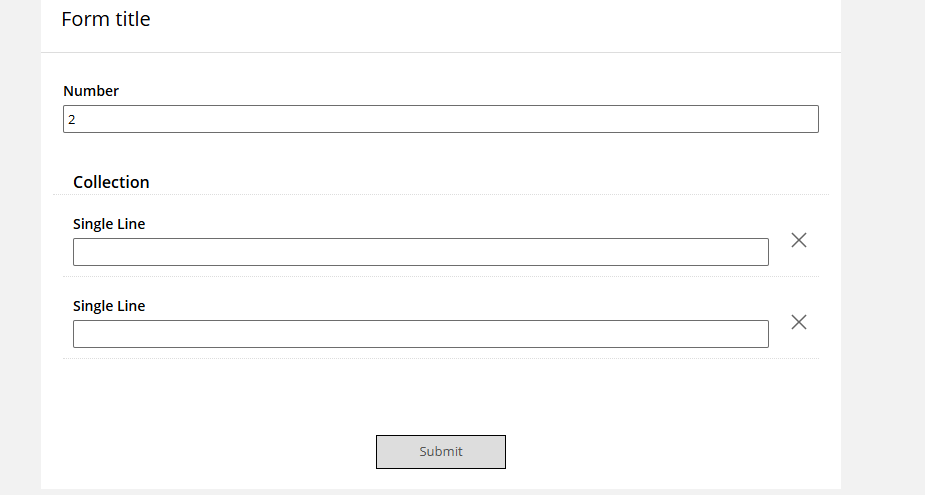
How it looks in action
- User opens the form
- User types 3 in the Number field
- User clicks + Add three times → three sets appear
- On the third set, the + Add button disappears
- User deletes one set → the + Add button reappears automatically
Tested on Laserfiche Modern Design Forms v12.0.2503
Let me know if this proves useful to you in any way. I’ve used it in several forms where it was necessary to set a limit on the number of previous entries allowed for the user filling out the form. There might be another approach to this solution, one that I typically use, but I haven't investigated it yet, as this method works perfectly for me.
 I realized this when I saw your code, which is correct for the case of tables; you did a great job.