Hi Blake! as you say changeFieldSettings does not expose a date format option for DateTime fields, and the documentation isn't outdated; it's simply a feature that hasn't been implemented in the LFForm API yet.
That said, here's a workaround that achieves exactly what you need using only the existing LFForm interfaces.
The approach: Instead of relying on the DateTime field's native picker, you use a Single Line field as the visible input (where the user types the date), and a hidden DateTime field that stores the actual parsed value for the process. JavaScript handles the formatting and validation in between.
How it behaves at runtime:
- When the user selects US, the visible field shows the label Date (MM/DD/YYYY) and formats input accordingly.
- When the user selects Canada, it switches to Date (DD/MM/YYYY).
- As the user types digits, slashes are inserted automatically (e.g. typing 01152025 renders as 01/15/2025).
- Once all 8 digits are entered, the script validates the date (including edge cases like Feb 30) and writes the ISO value YYYY-MM-DD into the hidden DateTime field.
- A confirmation message (✔ Valid date: 15 Jan 2025) or a warning (⚠ Invalid date) appears below the field in real time.
- Submission is blocked if no valid date has been stored.
Fields needed on your form:
Country selector (Dropdown), Variable name: Country
Visible date input (Single Line), Variable name: Date_Display
Data storage (DateTime, hidden by JS), Variable name: Date_Field
The country field values must match exactly "US" and "Canada" in the script, or you can update the string comparisons to match whatever values you're using. Adding more countries is just a matter of adding else if blocks to two functions.
Hope this helps! It would definitely be great to see native date format control added to changeFieldSettings in a future release, worth submitting as a product idea if you haven't already.
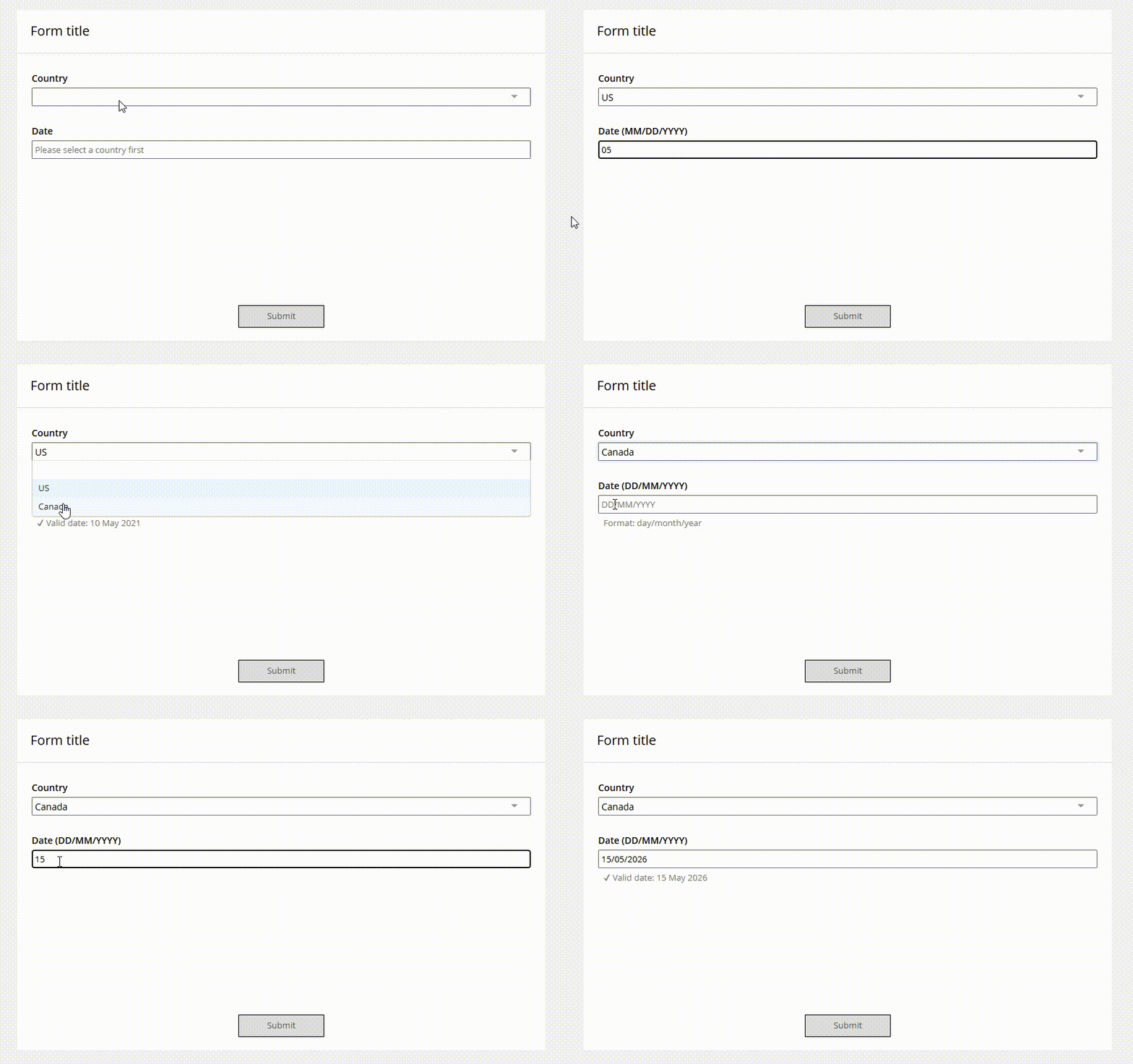
Here is the code:
// ================================================================
// SOLUTION OVERVIEW:
// ================================================================
//   1. Hide the actual DateTime field (used only for data storage).
//   2. Show a Single Line field where the user types the date.
//   3. As the user types, auto-insert "/" separators in real time.
//   4. Once 8 digits are entered, parse the date according to the
//      country selected (US = MM/DD/YYYY, Canada = DD/MM/YYYY).
//   5. If valid, write the ISO date (YYYY-MM-DD) into the hidden
//      DateTime field and show a confirmation message.
//   6. Block form submission if no valid date has been stored.
//
// FORM FIELDS REQUIRED:
//   - Country selector  → Dropdown or Radio  → variableName: "Country"
//                         Values must be exactly "US" and "Canada"
//   - Visible date      → Single Line        → variableName: "Date_Display"
//   - Hidden date store → DateTime           → variableName: "Date_Field"
//
// To add more countries, extend the parseDate() and
// updatePlaceholder() functions with additional else-if blocks.
// ================================================================


// ================================================================
// SECTION 1 — FIELD REFERENCES
// Centralized config so IDs/names are easy to update in one place.
// ================================================================
const FIELD = {
  country:     { variableName: "Country" },      // Country selector field
  dateDisplay: { variableName: "Date_Display" }, // Single Line shown to user
  dateHidden:  { variableName: "Date_Field" },   // DateTime field (hidden)
};


// ================================================================
// SECTION 2 — INITIALIZATION
// Runs once when the form loads.
// ================================================================

// Hide the real DateTime field — users should never interact with it directly.
LFForm.hideFields(FIELD.dateHidden);

// Read the current country value (useful if form reloads with a saved draft)
// and set the correct placeholder/label right away.
updatePlaceholder(LFForm.getFieldValues(FIELD.country));


// ================================================================
// SECTION 3 — COUNTRY CHANGE HANDLER
// Fires whenever the user changes the country selection.
// Updates the visible label/placeholder and clears both date fields
// to avoid storing a date interpreted under the wrong format.
// ================================================================
LFForm.onFieldChange(function () {

  const country = LFForm.getFieldValues(FIELD.country);

  // Update the label, placeholder, and subtext of the visible field
  updatePlaceholder(country);

  // Clear the visible input so the user re-enters the date
  LFForm.setFieldValues(FIELD.dateDisplay, "");

  // Clear the stored ISO date in the hidden DateTime field
  LFForm.setFieldValues(FIELD.dateHidden, { dateStr: "" });

}, FIELD.country);


// ================================================================
// SECTION 4 — DATE INPUT HANDLER
// Fires on every keystroke in the visible Single Line date field.
// Handles auto-formatting and real-time validation.
// ================================================================
LFForm.onFieldChange(function () {

  const country  = LFForm.getFieldValues(FIELD.country);
  const rawInput = LFForm.getFieldValues(FIELD.dateDisplay) || "";
  const trimmed  = rawInput.trim();

  // Do nothing if the field is empty
  if (!trimmed) return;

  // Strip everything except digits for processing
  const digitsOnly = trimmed.replace(/\D/g, "");

  // Auto-format: insert "/" separators as the user types
  const formatted = autoFormat(digitsOnly);

  // Only update the field if the formatted string differs from what's
  // already there — prevents an infinite re-render loop
  if (formatted !== trimmed) {
    LFForm.setFieldValues(FIELD.dateDisplay, formatted);
  }

  // Only attempt to parse once the user has entered all 8 digits
  if (digitsOnly.length === 8) {

    const isoDate = parseDate(digitsOnly, country);

    if (isoDate) {
      // Valid date — store it in the hidden DateTime field
      LFForm.setFieldValues(FIELD.dateHidden, { dateStr: isoDate });

      // Show a confirmation message below the field
      LFForm.changeFieldSettings(FIELD.dateDisplay, {
        subtext:    "✔ Valid date: " + toReadable(isoDate),
        CSSClasses: "date-valid"
      });

    } else {
      // Invalid date — clear the hidden field and warn the user
      LFForm.setFieldValues(FIELD.dateHidden, { dateStr: "" });

      LFForm.changeFieldSettings(FIELD.dateDisplay, {
        subtext:    "⚠ Invalid date. Please check the format.",
        CSSClasses: "date-invalid"
      });
    }

  } else {
    // User is still typing — clear any previous status message
    LFForm.changeFieldSettings(FIELD.dateDisplay, {
      subtext:    "",
      CSSClasses: ""
    });
  }

}, FIELD.dateDisplay);


// ================================================================
// SECTION 5 — FORM SUBMISSION GUARD
// Blocks submission if no valid ISO date has been saved yet.
// ================================================================
LFForm.onFormSubmission(function () {

  const storedDate = LFForm.getFieldValues(FIELD.dateHidden);

  if (!storedDate) {
    return { error: "Please enter a valid date before submitting." };
  }

});


// ================================================================
// HELPER FUNCTIONS
// ================================================================

/**
 * autoFormat(digits)
 *
 * Inserts "/" separators into a string of digits as the user types,
 * producing the visual pattern XX/XX/XXXX.
 *
 * The visual separator pattern is the same for both US and Canada —
 * the difference in those locales is purely in how the segments are
 * *interpreted* (MM/DD vs DD/MM), which is handled in parseDate().
 *
 * Examples:
 *   "01"       → "01"
 *   "0115"     → "01/15"
 *   "01152025" → "01/15/2025"
 *
 * @param  {string} digits - Raw digit string (no separators), max 8 chars
 * @returns {string} Formatted string with "/" separators inserted
 */
function autoFormat(digits) {
  // Cap at 8 digits to prevent over-entry
  const d = digits.substring(0, 8);

  if (d.length <= 2) return d;
  if (d.length <= 4) return d.substring(0, 2) + "/" + d.substring(2);

  return d.substring(0, 2) + "/" + d.substring(2, 4) + "/" + d.substring(4);
}


/**
 * parseDate(digits, country)
 *
 * Interprets exactly 8 digits as a date according to the country's
 * format convention, then validates the result using JavaScript's
 * native Date object (which catches edge cases like Feb 30, etc.).
 *
 * Format by country:
 *   "US"     → MM DD YYYY  (positions 0-1 = month, 2-3 = day)
 *   "Canada" → DD MM YYYY  (positions 0-1 = day,   2-3 = month)
 *
 * @param  {string} digits  - Exactly 8 digits, e.g. "01152025"
 * @param  {string} country - Country value from the form selector
 * @returns {string|null} ISO date string "YYYY-MM-DD", or null if invalid
 */
function parseDate(digits, country) {
  if (!digits || digits.length !== 8) return null;

  let day, month, year;

  if (country === "US") {
    // US format: MM/DD/YYYY
    month = parseInt(digits.substring(0, 2), 10);
    day   = parseInt(digits.substring(2, 4), 10);
    year  = parseInt(digits.substring(4, 8), 10);
  } else {
    // Canada (and most other countries): DD/MM/YYYY
    day   = parseInt(digits.substring(0, 2), 10);
    month = parseInt(digits.substring(2, 4), 10);
    year  = parseInt(digits.substring(4, 8), 10);
  }

  // Quick range check before constructing a Date object
  if (month < 1 || month > 12)   return null;
  if (day   < 1 || day   > 31)   return null;
  if (year  < 1900 || year > 2100) return null;

  // Use Date to catch invalid combinations like Feb 30, Apr 31, etc.
  // Note: months in JS Date are 0-indexed, so subtract 1
  const dateObj = new Date(year, month - 1, day);

  const isValid =
    dateObj.getFullYear() === year  &&
    dateObj.getMonth()    === month - 1 &&
    dateObj.getDate()     === day;

  if (!isValid) return null;

  // Return the ISO format required by LFForm.setFieldValues for DateTime fields
  const mm = String(month).padStart(2, "0");
  const dd = String(day).padStart(2, "0");
  return `${year}-${mm}-${dd}`;
}


/**
 * toReadable(isoDate)
 *
 * Converts an ISO date string (YYYY-MM-DD) into a short human-readable
 * format used in the confirmation subtext, e.g. "15 Jan 2025".
 *
 * @param  {string} isoDate - Date in "YYYY-MM-DD" format
 * @returns {string} Human-readable date string
 */
function toReadable(isoDate) {
  const [y, m, d] = isoDate.split("-");
  const months = [
    "Jan","Feb","Mar","Apr","May","Jun",
    "Jul","Aug","Sep","Oct","Nov","Dec"
  ];
  return `${d} ${months[parseInt(m, 10) - 1]} ${y}`;
}


/**
 * updatePlaceholder(country)
 *
 * Updates the label, placeholder text, and subtext of the visible
 * Single Line field to reflect the expected input format for the
 * currently selected country.
 *
 * Extend this function with additional else-if blocks to support
 * more countries or regions.
 *
 * @param {string} country - Country value from the form selector
 */
function updatePlaceholder(country) {
  if (country === "US") {
    LFForm.changeFieldSettings(FIELD.dateDisplay, {
      label:       "Date (MM/DD/YYYY)",
      placeholder: "MM/DD/YYYY",
      subtext:     "Format: month/day/year"
    });
  } else if (country === "Canada") {
    LFForm.changeFieldSettings(FIELD.dateDisplay, {
      label:       "Date (DD/MM/YYYY)",
      placeholder: "DD/MM/YYYY",
      subtext:     "Format: day/month/year"
    });
  } else {
    // No country selected yet — show a neutral prompt
    LFForm.changeFieldSettings(FIELD.dateDisplay, {
      label:       "Date",
      placeholder: "Please select a country first",
      subtext:     ""
    });
  }
}